← Work
Marketing Tech Senior Product Designer · 2023

Mobile Personalisation

The first integration project after Swrve was acquired by MessageGears: bringing simple, marketer-friendly personalisation into a platform where personalisation meant writing code.

Swrve was acquired by MessageGears in early 2023. One of the reasons we were bought was the workspace we’d built for marketers — thousands of people used it every day to send highly personalised messages without needing help to do it.

On paper both companies did the same thing. In practice they did it in opposite directions. Swrve was a cloud platform that ingested customer data and shaped it. MessageGears sat on top of the customer’s own database and touched none of it — no formatting, no management, just reading it to send campaigns.

The wider project was bringing Push Campaigns into the combined platform. My piece was narrower and harder: bring the ease of personalising a message into a product where personalisation was expressed as code.

The challenge

I had a personalisation pattern that already worked. I’d watched marketers use it without trouble, so I had no interest in reinventing it. But the new environment carried complexity the old one never had to expose — setting an audience, choosing a personalisation type, recipient data, fallbacks, Freemarker templating, proprietary functions, letter typecasing.

Here is what a marketer was actually looking at. A first name with a fallback and a capitalisation rule:
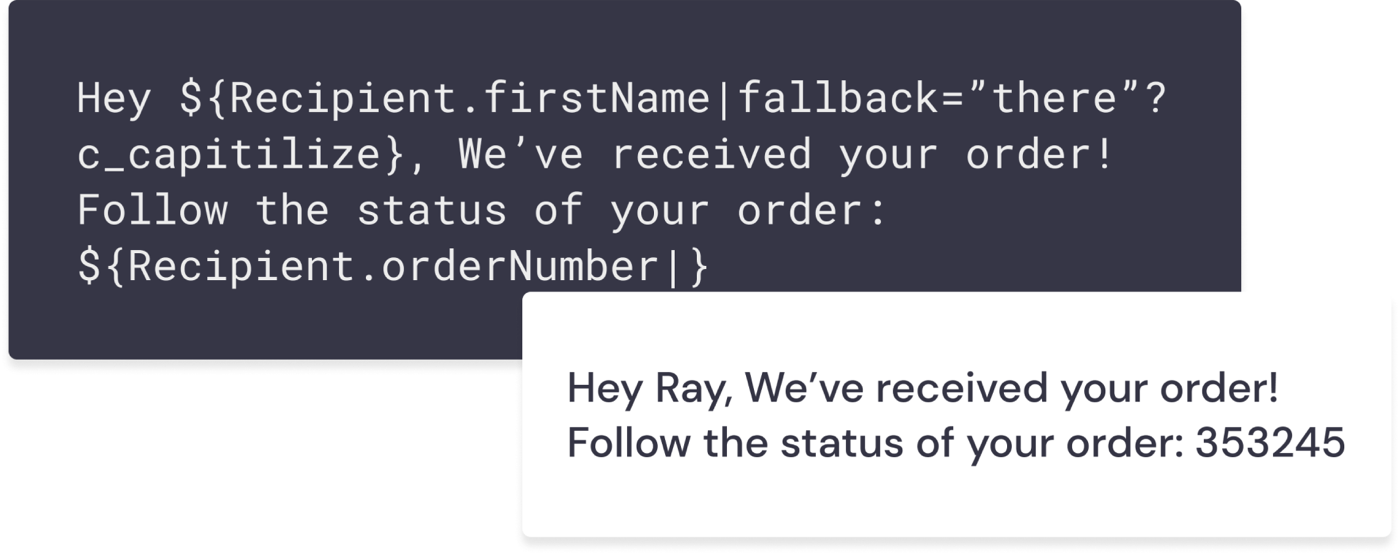
A dark code block reading: Hey ${Recipient.firstName|fallback="there"?c_capitilize}, We've received your order! Follow the status of your order: ${Recipient.orderNumber|}. Below it, a white card shows the rendered result: 'Hey Ray, We've received your order! Follow the status of your order: 353245'.
One line of copy, three concepts stacked into it — the recipient field, what to show when the field is empty, and how to case the result. The message on the right is what the customer sees.

And anything conditional meant writing template logic:
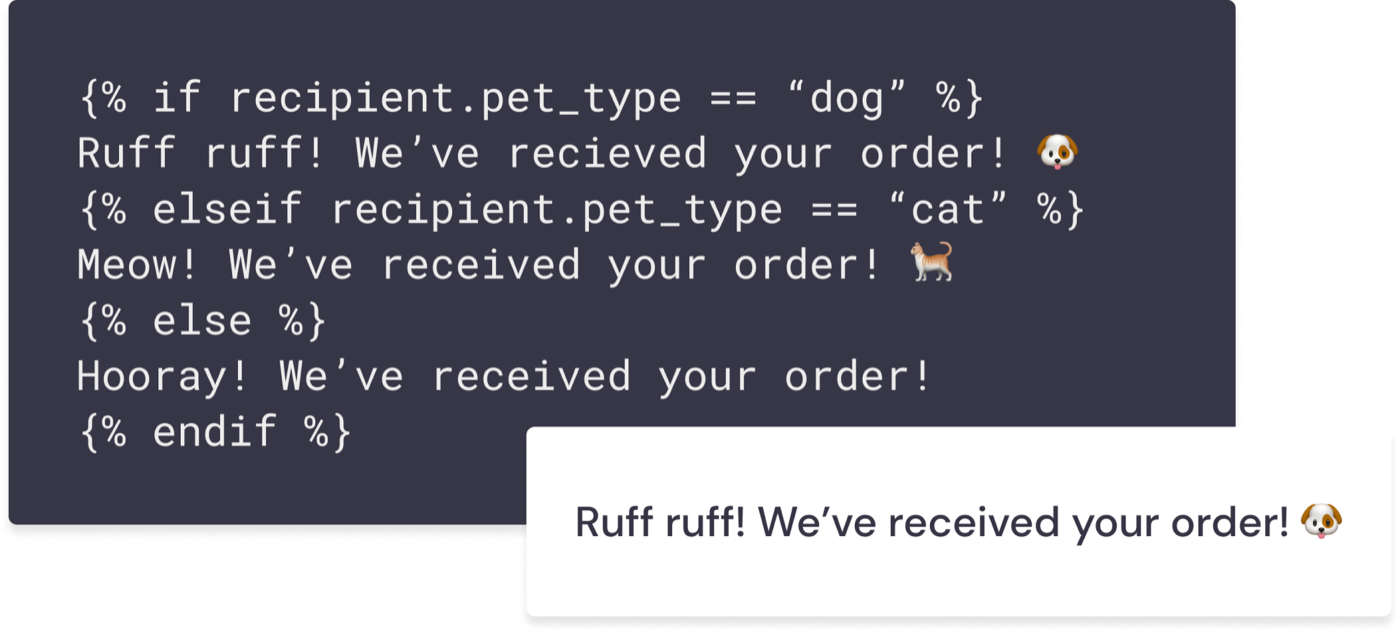
A dark code block containing a Freemarker conditional: if recipient.pet_type equals 'dog', 'Ruff ruff! We've received your order!'; elseif 'cat', 'Meow! We've received your order!'; else 'Hooray! We've received your order!'. A white card below shows the rendered result: 'Ruff ruff! We've received your order!'
A branch on one recipient property. The output is a single cheerful sentence; getting there meant knowing if/elseif/else and getting the syntax exactly right.

MessageGears’ existing customers were mostly marketing operations people who were fluent in this. We wanted to keep serving them while extending the same capability to marketers who would never write a recipient field by hand, let alone an if/else.

What I did

Before designing anything I went looking for evidence of how the advanced personalisation was actually being used. I talked to sales engineers and customer success colleagues and collected real examples from real accounts.

The answer decided the project: six customers were using the existing push product, and not one of them was using advanced personalisation. After talking it through with the team we made a deliberate call — optimise for the marketer who wants ${first.name}, not for the specialist writing template logic. That turned a sprawling problem into a narrow one, and from that point we knew exactly which flows we were designing and who for.
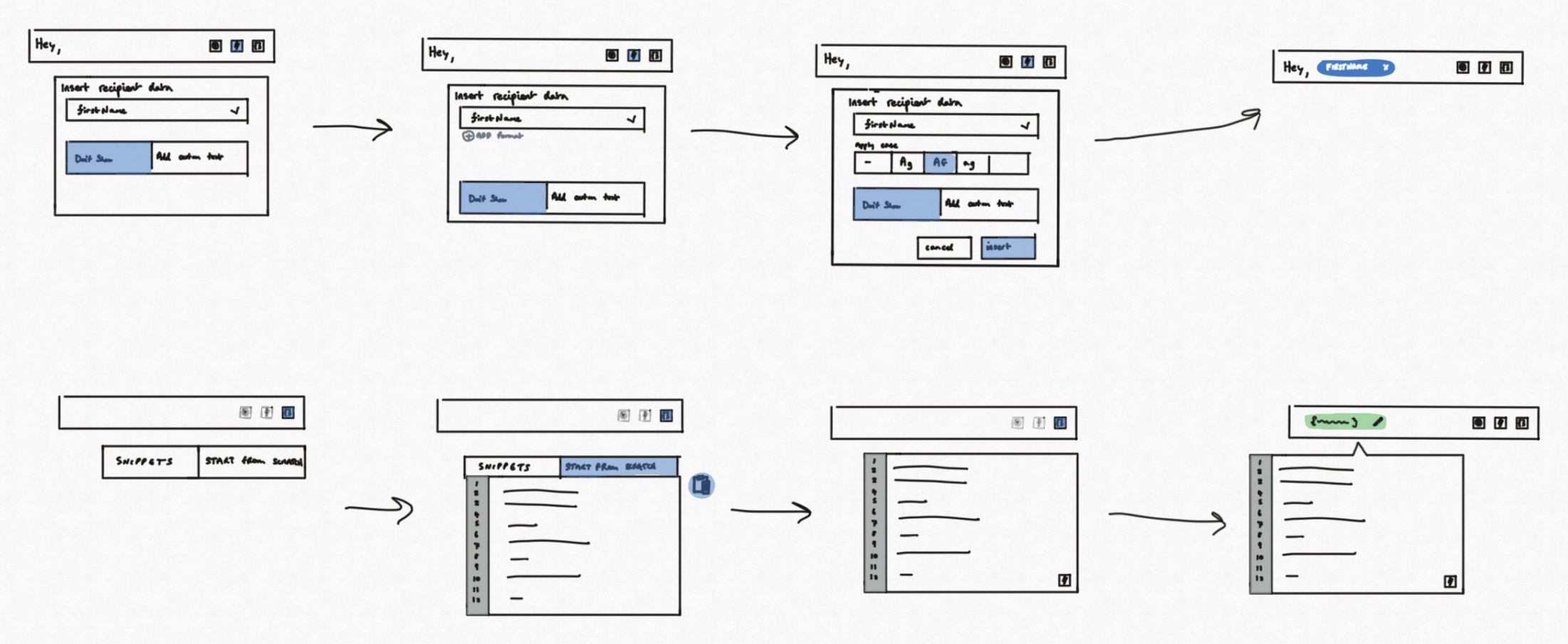
Two rows of hand-drawn wireframes. The top row moves through inserting recipient data: a message field, a panel to pick FirstName, then a lettercase row, then the finished message with a personalisation token in it. The bottom row shows the alternative path — a snippets and code editor route for technical users.
Two routes out of the same field. The simple insert flow along the top, the snippets and code editor for people who'd rather write it themselves along the bottom.

Then a series of working sessions with my PM, critiques and workshops with the design team, and validation with the same stakeholders I’d interviewed at the start. The pattern had to hold across every touchpoint in the product where personalisation could be applied, not just push.
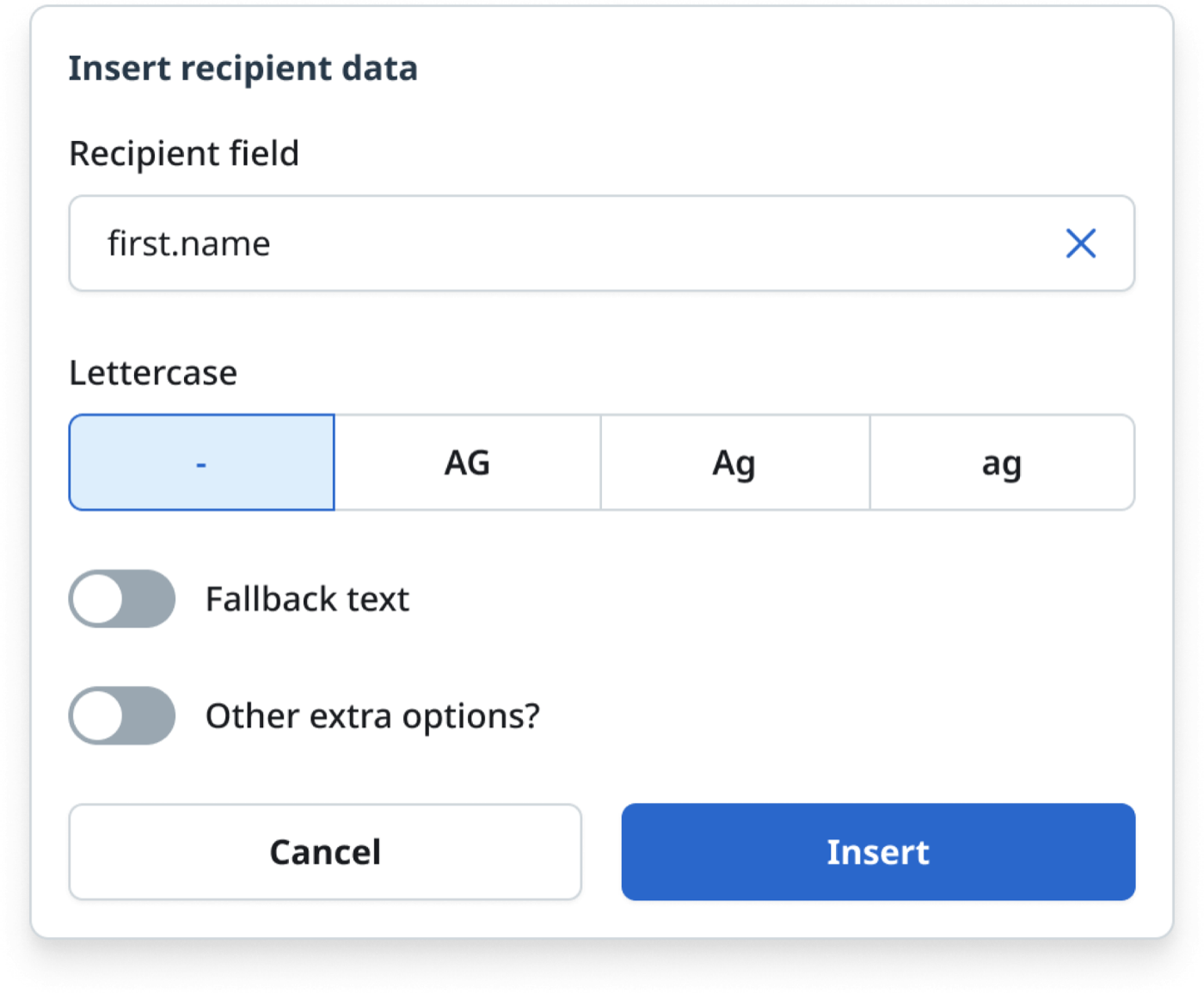
An early version of the Insert recipient data panel. It has a recipient field set to first.name, a four-option Lettercase row, and two toggle switches labelled 'Fallback text' and 'Other extra options?'.
An early pass. Everything is present and switched off, which put the burden of understanding fallbacks and casing on the marketer before they'd typed a word.
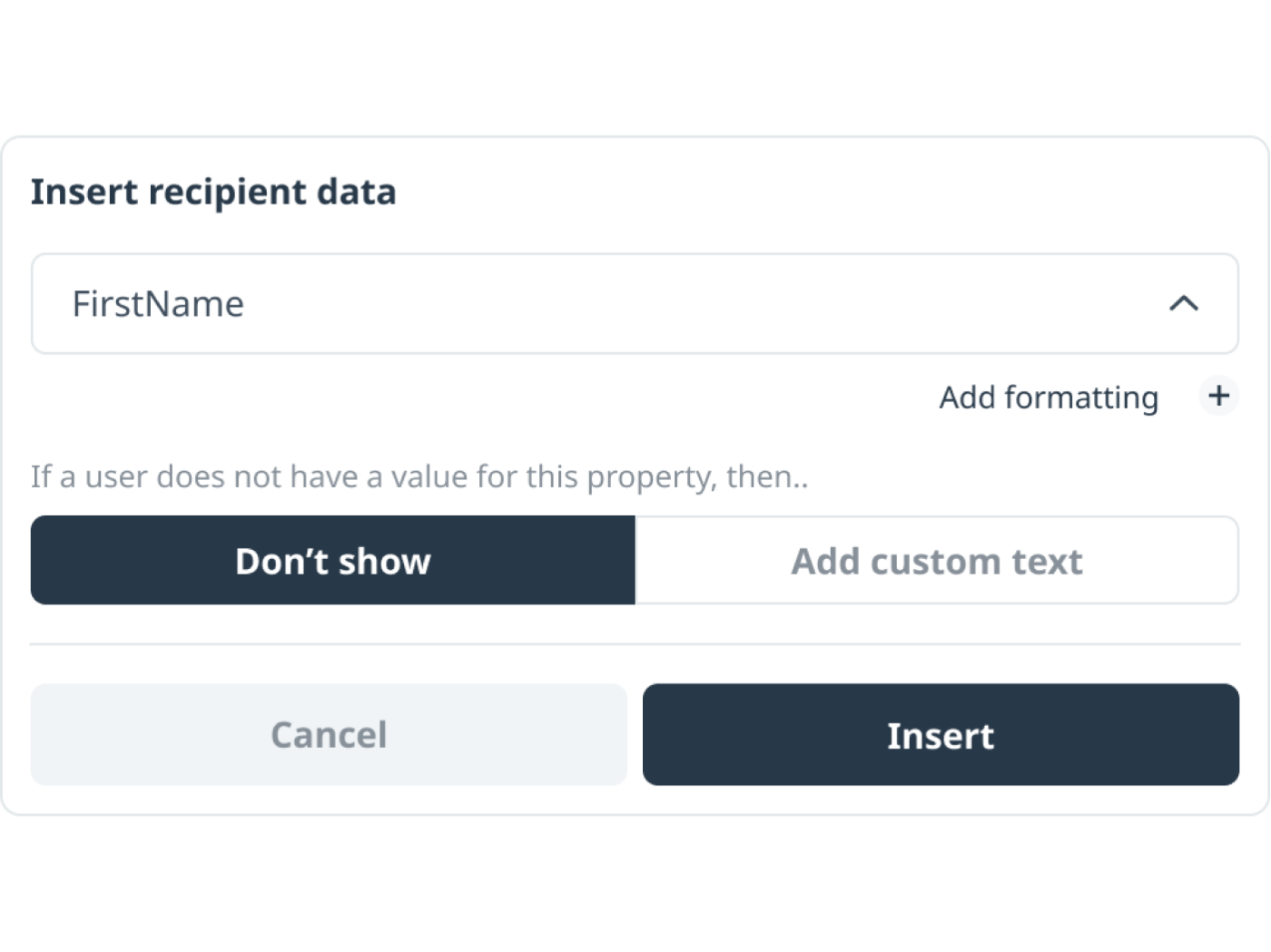
A later version of the panel. It shows a FirstName field, an 'Add formatting' control with a plus button, the question 'If a user does not have a value for this property, then..' with a two-option choice of 'Don't show' or 'Add custom text', and Cancel and Insert buttons.
The same panel with formatting moved behind an 'Add formatting' control, and the fallback rewritten as a question rather than a setting.
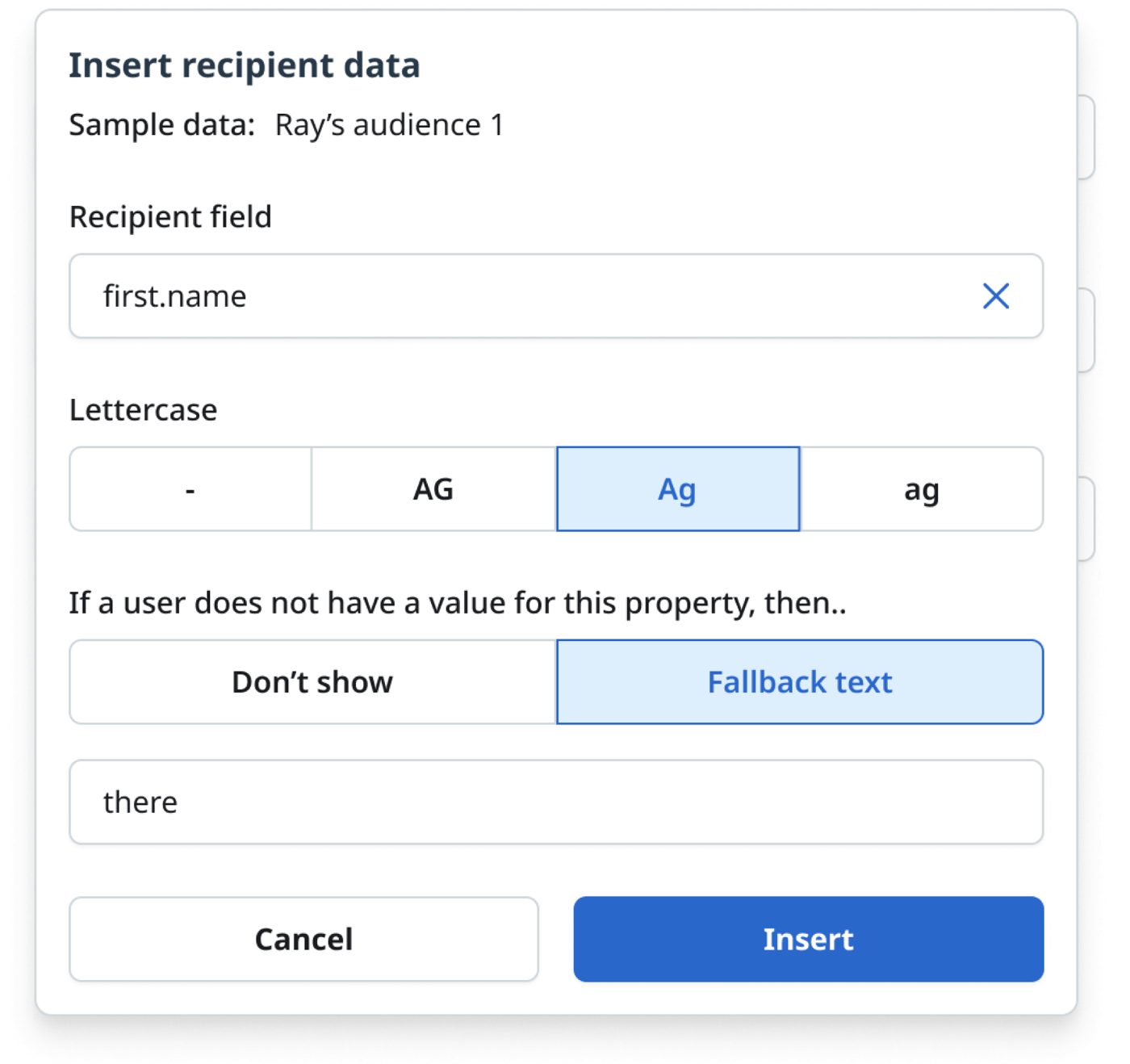
The resolved Insert recipient data panel. It names the sample data set as 'Ray's audience 1', has a recipient field of first.name, a Lettercase row with four options and 'Ag' selected, the prompt 'If a user does not have a value for this property, then..' with 'Fallback text' selected, and a text field containing the word 'there'.
Where it landed. The syntax from the first image, decomposed into three plain choices — which field, how to case it, what to say when it's missing — with a named sample audience so the marketer can see who they're writing to.
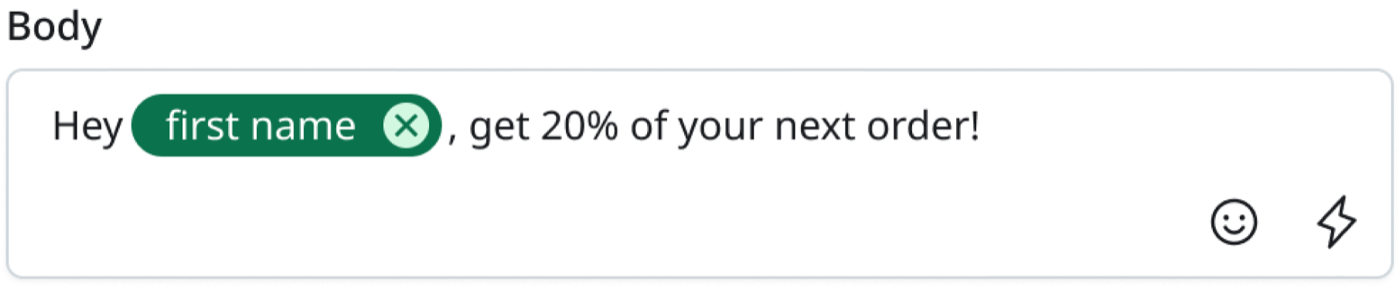
A message Body field containing the text 'Hey', then a green rounded token labelled 'first name' with a small remove button, then ', get 20% of your next order!'. An emoji button and a personalisation button sit at the bottom right of the field.
In the message itself, the field becomes a token you can read and delete like a word. Nothing about the underlying syntax is visible unless you go looking for it.

The technical customers didn’t lose anything. They kept a direct route to Freemarker and the proprietary functions, with worked examples they could copy rather than recall.
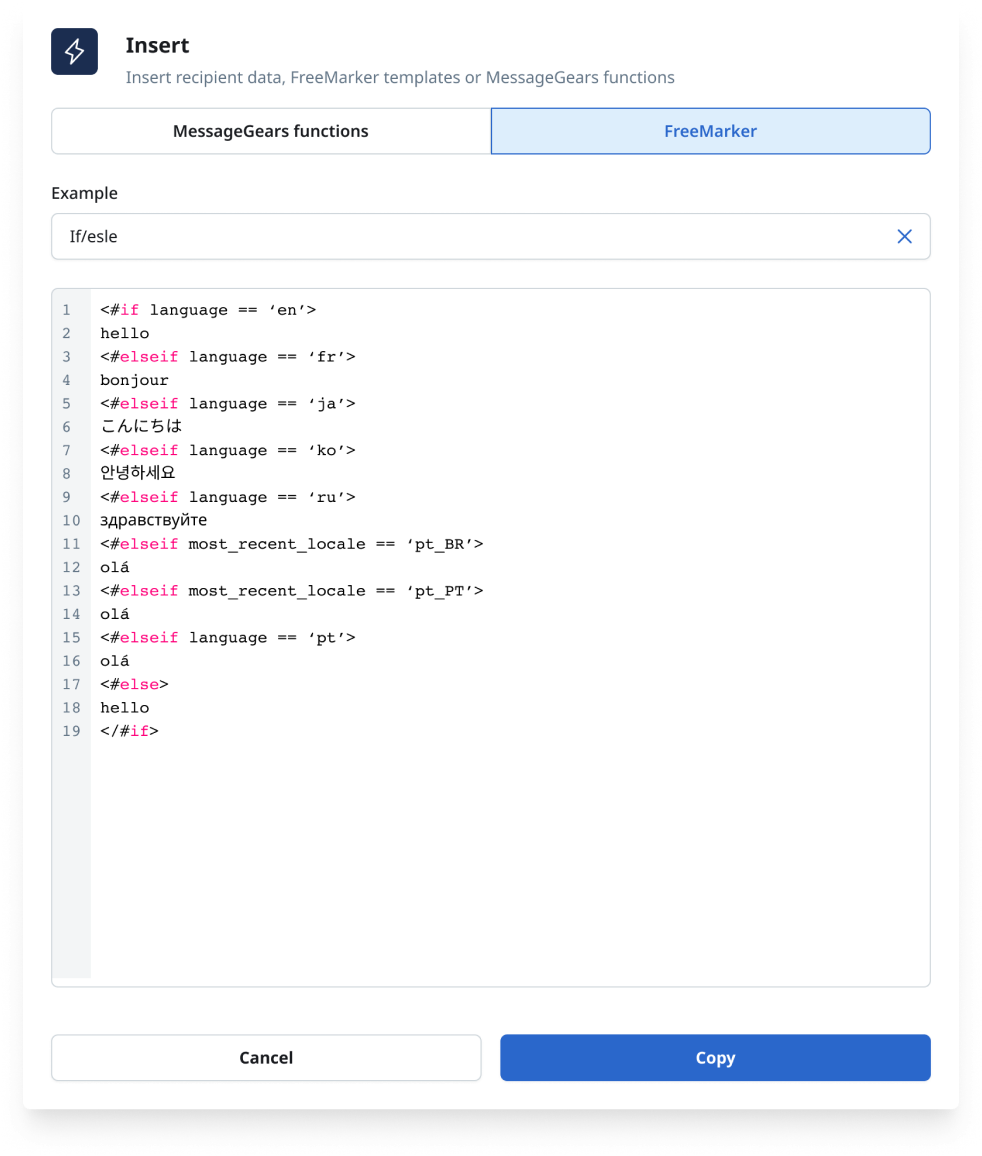
An Insert panel headed 'Insert recipient data, FreeMarker templates or MessageGears functions'. Two tabs read 'MessageGears functions' and 'FreeMarker', with FreeMarker selected. An Example dropdown is set to 'If/else', and a syntax-highlighted, line-numbered code sample shows a conditional greeting across eight languages. Cancel and Copy buttons sit at the bottom.
The escape hatch, and the teaching surface. Picking an example puts working code in front of someone who hasn't written it before — the beginning of the learning idea, rather than the finished version of it.

What I took from it

Scoping is a research outcome, not an administrative one. Six customers and zero advanced users is the finding the whole project turned on, and it took a few conversations to get. Everything downstream was easier because we’d narrowed the problem honestly instead of designing for a user we’d assumed into existence.

This was also the first project the two companies ran together, which made the working relationship part of the deliverable. I paid as much attention to how we collaborated — who I brought in, when, and how the design team showed its work — as to what shipped, because those relationships had to outlast this milestone.

And I took the pattern further than the brief needed. I mapped how it would extend to the channels we knew were coming, and started on a version that teaches as it goes, so a marketer meeting conditional logic for the first time could learn it in the place they’d use it.